
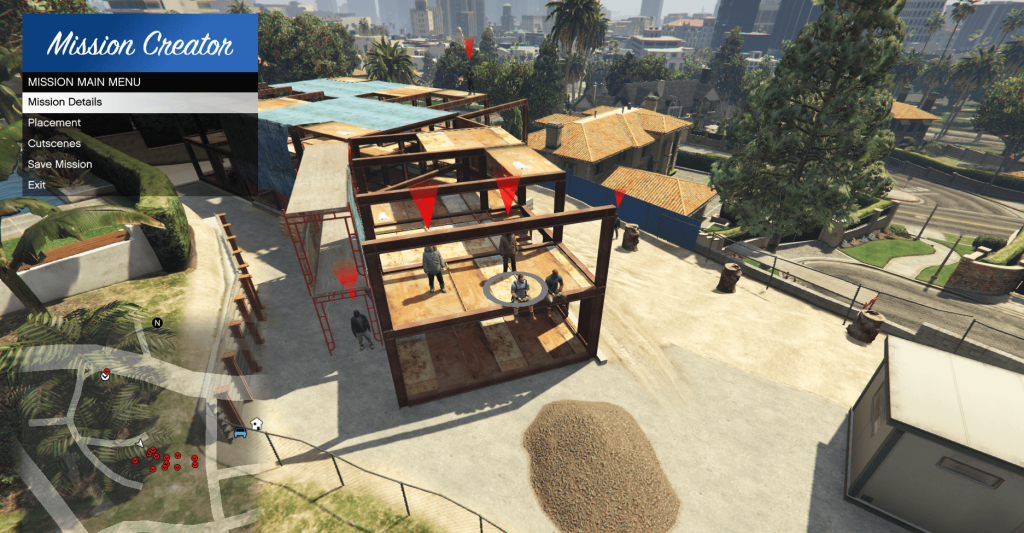
RageNativeUI is a popular and essential library used by GTA V mod developers to create smooth, interactive, and user-friendly menus within their plugins. Specifically designed to work alongside RAGEPluginHook, it helps modders integrate menus for various purposes like police roleplay, vehicle management, and gameplay tools without the complexity of building UI systems from scratch. For anyone working within the GTA V modding scene, especially for law enforcement mods such as LSPD:FR, RageNativeUI has become a trusted and time-saving solution.
With its clean design, customizable features, and ease of use, RageNativeUI allows developers to focus more on building creative, engaging content rather than struggling with user interface challenges. It ensures menus not only look professional but also function reliably within the game environment. This guide will help you understand what RageNativeUI is, how it works, and why it has become so important in the world of GTA V modding.
What is RageNativeUI?
Definition of RageNativeUI
RageNativeUI is a menu library for GTA V mods designed specifically to work with RAGEPluginHook, which is a plugin platform used to create law enforcement and gameplay enhancement mods. In simple terms, RageNativeUI provides the building blocks for creating interactive menus inside the game, making it easier for players to navigate through mod features.
Instead of manually designing each element of a menu or building UI systems from scratch, RageNativeUI gives developers a ready-made, standardized, and customizable solution for their user interface needs. It helps modders focus on the functionality of their mods rather than getting stuck on UI challenges.
Purpose of RageNativeUI
The primary purpose of RageNativeUI is to offer an efficient way to create professional-looking, consistent, and user-friendly menus. Whether you are building a police mod, vehicle management system, roleplay plugin, or developer tool, RageNativeUI ensures that your in-game menus look polished and behave reliably.
It allows for the creation of:
- Main menus
- Submenus
- Lists of items
- Toggle switches
- Sliders
- Informational panels
Importance of RageNativeUI in GTA V Modding
Why RageNativeUI is Popular Among Modders
RageNativeUI is popular because it saves time, ensures consistency, and simplifies complex UI tasks. Without this library, developers would need to manually code every button, list, and menu from the ground up, which would take considerable effort and often lead to inconsistent user experiences across different mods.
It allows modders to focus on developing the features of their plugins while relying on RageNativeUI to handle the user interface in a clean, predictable, and visually appealing manner.
Trusted by the Modding Community
RageNativeUI is trusted by leading developers in the GTA V modding community. Many popular plugins, especially those built for LSPD:FR (Los Santos Police Department: First Response), rely on RageNativeUI for their user interfaces. This wide adoption speaks to its stability and effectiveness.
Key Features of RageNativeUI
Simplifies Menu Creation
One of the standout features of RageNativeUI is how it simplifies the process of building menus. It allows modders to create complex menu systems without the need for deep expertise in graphics programming or user interface design.
Supports Advanced Menu Elements
RageNativeUI supports a variety of elements commonly needed in game mods, including:
- Lists for selecting options
- Checkboxes for toggling settings on or off
- Sliders for adjusting values such as volume or brightness
- Submenus for organizing complex categories
- Descriptions for guiding the user through the menu
Event-Driven User Interaction
Menus built with RageNativeUI are responsive to player input. This means that players can easily navigate, select, and modify options, while mod developers can define what happens when an option is selected or adjusted.
Customizable Appearance
The appearance of menus created with RageNativeUI can be customized to match the style of the mod. Developers can adjust colors, fonts, and other visual elements to create a user experience that fits seamlessly with their plugin’s design.
How RageNativeUI Enhances the Modding Experience
Makes Development Faster and Easier
RageNativeUI dramatically speeds up the mod development process. Instead of wasting time coding menu logic and handling user input from scratch, modders can quickly assemble complex menus using pre-built components.
Improves User Experience
Because RageNativeUI provides a consistent interface style, it helps players interact with mods more intuitively. Whether a player is using one mod or several, they can expect menus that feel familiar and easy to use.
Reduces Bugs and Maintenance
By relying on a well-tested library like RageNativeUI, mod developers reduce the likelihood of bugs related to UI navigation, input handling, and menu management. This leads to more stable mods and less time spent fixing issues.
Use Cases of RageNativeUI in GTA V Plugins
Law Enforcement Mods
RageNativeUI is most commonly seen in police mods such as those built for LSPD:FR. These mods often require detailed menus to manage callouts, issue citations, spawn vehicles, and handle various law enforcement activities. RageNativeUI provides the ideal framework for these interfaces.
Roleplay Mods
Roleplay mods benefit from interactive menus for tasks such as selecting jobs, managing characters, accessing inventories, and interacting with in-game systems. RageNativeUI helps organize these features into clean, user-friendly menus.
Utility and Developer Tools
Developers also use RageNativeUI to create tools that allow them to test features, spawn objects, change weather, or adjust game variables through a simple interface. This is especially useful for debugging and development purposes.
Step-by-Step Guide to Using RageNativeUI Without Code
Download RageNativeUI
The first step to using RageNativeUI is downloading the library from its official source, typically GitHub or a trusted modding community website. Always ensure you are downloading the latest version compatible with the version of RAGEPluginHook you are using.
Install RageNativeUI in Your Project
After downloading, RageNativeUI must be added to your modding project. This involves referencing the library in your development environment so you can access its features when building your menus.
Create Your Menus Using the Library’s Features
Using RageNativeUI, you would begin structuring your menus. You would define what options appear, how they are organized, and what happens when a user interacts with them. The library allows you to stack menus, add submenus, and include various input types like lists and toggles.
Test and Refine Your Menus in GTA V
Once your menus are built, you can load your plugin into GTA V via RAGEPluginHook and test how your menus function within the game. You would check that menus open smoothly, respond correctly to inputs, and integrate properly with your plugin’s features.
Best Practices for Using RageNativeUI
Keep Menus Organized and Clear
Always structure your menus logically. Group similar functions together and use submenus when necessary to avoid overwhelming users with too many choices on a single screen.
Prioritize Usability
Menus should be easy to navigate. Avoid burying important options deep within multiple layers of submenus. Simplicity leads to better player engagement and fewer complaints.
Optimize for Performance
Well-structured menus will help maintain smooth gameplay performance. Avoid adding excessive or unnecessary elements that could slow down the game or clutter the interface.
Common Mistakes to Avoid with RageNativeUI
Overcomplicating the Menu Structure
Beginners sometimes create overly complex menus with too many layers or confusing hierarchies. Keep your menus intuitive and only as detailed as necessary.
Ignoring Compatibility
Ensure your version of RageNativeUI matches your version of RAGEPluginHook. Mismatched versions can lead to crashes or broken features.
Neglecting User Testing
Before releasing a mod, thoroughly test your menus. Check for responsiveness, clarity, and how well they integrate with the gameplay experience.
Resources for Learning RageNativeUI Effectively
Community Forums
Websites like LCPDFR.com and GTAForums offer discussion threads, guides, and user support specifically for RAGEPluginHook and RageNativeUI.
Video Tutorials
Many modders share step-by-step tutorials on platforms like YouTube, walking through menu creation and plugin development.
Documentation and Example Projects
While official documentation for RageNativeUI is limited, many GitHub repositories contain sample projects that demonstrate how to structure menus and manage interactions.
Comparison: RageNativeUI vs NativeUI
Different Platforms, Similar Goals
- RageNativeUI is used with RAGEPluginHook for plugins like LSPD:FR.
- NativeUI is used more with FiveM and ScriptHookVDotNet.
Both libraries aim to simplify menu creation, but they serve different parts of the modding community. If you are developing for RAGEPluginHook, RageNativeUI is the recommended choice for compatibility and consistency.
Popular Mods Using RageNativeUI
Many well-known mods rely on RageNativeUI for their interface. These include:
- StopThePed (for police interaction enhancements)
- UltimateBackup (for managing law enforcement backup)
- Compulite (for issuing citations and traffic stops)
These examples demonstrate how RageNativeUI contributes to professional, feature-rich mods.
Conclucion
RageNativeUI is an invaluable tool for anyone developing GTA V plugins with RAGEPluginHook. It streamlines the creation of user-friendly, professional-looking menus, which are crucial for delivering a polished gaming experience.By simplifying complex tasks, RageNativeUI allows modders to focus on innovation and gameplay features rather than worrying about building interfaces from scratch. Its widespread use, community support, and proven reliability make it a must-have library for serious GTA V mod developers.